
Introduction
CAN messages cannot be seen by the human eye. We need a set of tools to turn a stream of fluctuating voltages into something we can see and understand. This is what CAN hardware interfaces and CAN software can do for us. Similar to how an electrician uses a multi-meter to read invisible voltages present on a wire, we can use a CAN hardware interface with CAN software to see the messages that are streaming over the network.
Hardware Interfaces
There are several hardware interfaces available, and most of them come with their own software. I am going to talk about two options here that are fairly common and backed by companies that offer support and educational resources. They are also easy to set up and use, which is a major consideration if you are a beginner and just want to learn more about vehicle networks. Despite having higher price tags, these interfaces are well worth every penny. Just to get ahead of the price discussion, let's look at some cheaper options and discuss why they might not be a great idea.
What about the $25 hardware interface I found on internet.com?
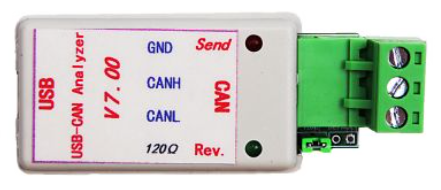
Sure, you might find some less expensive hardware interfaces than the two covered here. If you are just learning about CAN and not a software engineer, I would avoid these at all costs. Most of them do not come with software and do not work with existing software. You usually need to figure out some missing piece between the hardware and software, use some open source software that is not easy to set up, or write your own software. Unless you want another project (or headache), stick with the tools that work out-of-the-box. At least for now.
I already have a Nexiq vehicle adapter, why can't I just use that?
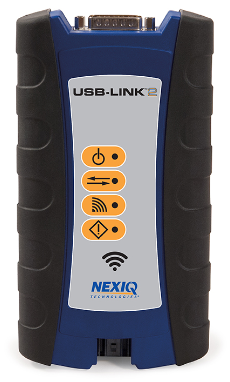
The Nexiq vehicle adapters use a protocol called RP1210, which is different than a CAN-to-USB hardware interface. Because of this, it's difficult to find CAN bus analysis software that works with a RP1210 adapter. You may be able to purchase a plugin for some Peak or Vector software, but at that point you'll be spending more than either one of the two adapters we're going to cover and they come with free software. If you already have a Nexiq and use it with brand-specific software like Cummins Insite or Allison DOC, it may be possible to read and translate live CAN bus messages. However, these tools aren't designed for bus analysis and may not work for the specific purpose of troubleshooting CAN communication issues.
Software
The software reads the raw CAN data from the hardware interface and displays it in a way that we see all of the messages, and display them in a way that allows human eyes to analyze what is going on. There are a few key features that are must-have for CAN analysis software to be useful to us.
Viewing live data in fixed positions
The way CAN messages are actually sent and received on a network is not very human-friendly. The messages are re-sent every few hundred milliseconds and some busses may see a new message every few milliseconds. Human visual reaction time is somewhere on the order of 200 ms, so there's no way we would be able to see and mentally process a raw stream of CAN messages in real time.
The software should have a fixed position viewer that organizes all the received messages in order by message ID. The data field will update if a new message is received that differs from the displayed data. This way, you only see changes in the data, which is usually all we care about. This makes it very easy to find a message and see how it's changing relative to what the physical system is doing. For example, you can step on the brake pedal and easily see the bits for that message change without seeing the thousands of other messages that were sent in that same moment.
Recording data and saving a log
Opposite of the fixed position viewer, a logger just displays the raw network traffic in the order in which it was received. This can be important when trying to troubleshoot timing or sequencing issues on the order of milliseconds. The log viewer isn't really useful since the messages are coming at us so fast, but if you can save and export that list of messages then it can be reviewed later. The log should be able to be copied to the clipboard, or exported in a variety of formats for later analysis. If you can't export the data to be saved and viewed later, it's not a very useful logger.
Sending messages
Although rare, sometimes we may need to send a message. The CAN software should have the ability to enter a message ID, DLC, and data and send it to the bus. Periodic transmission, or automatically sending the message every xx milliseconds, is extremely helpful since most messages are periodically transmitted every few hundred milliseconds. The software should also give you the ability to save a list of messages and execute their periodic transmissions with a single click. This way, you can reproduce some common bus scenarios to test functionality or troubleshoot features.
Modifying message format
This is not as critical as the other viewing/logging options, but sometimes it is nice to be able to switch between hex, decimal, or ascii message data formatting. Hex seems to be nearly universal, but the SAE J1939 standard often references decimal numbers. It can be handy to just see the message ID's as decimal instead of needing to translate between hex and decimal.
Peak System PCAN-USB and PCAN-USB FD
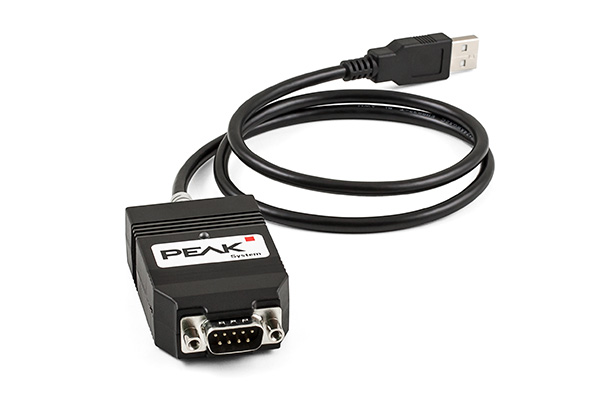
The Peak System PCAN-USB and PCAN-USB FD (Flexible Data-Rate) adapters are the lower cost option, with a price tag under $300 at the time of this writing. Given the growing popularity of CAN FD in automotive systems, I would suggest getting the FD version of any adapter. The software and drivers used with these hardware interfaces is a free download from Peak System and it does everything you'll need to analyze and troubleshoot CAN bus activity.
Peak System PCAN-View
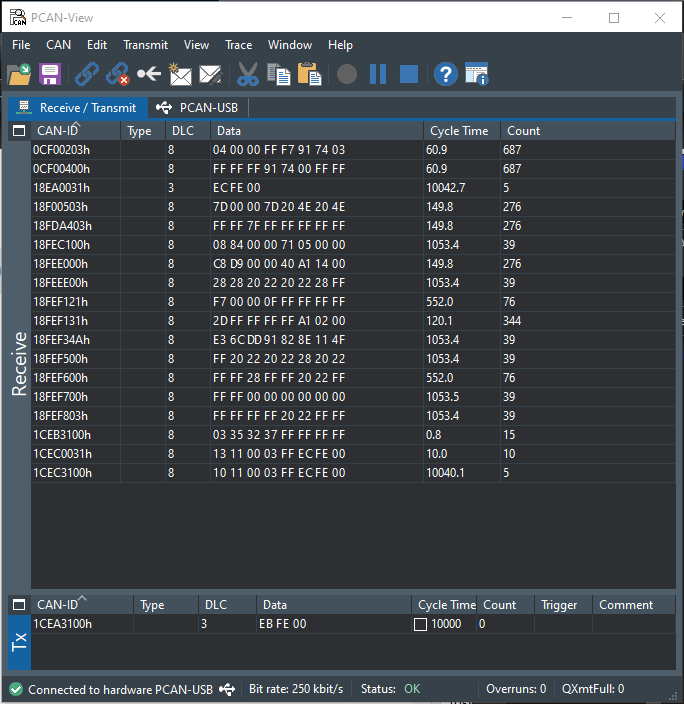
The Peak System software is a free download and is as easy to set up as any other Windows software. Install the software, install the drivers, plug and play.
When you first open the PCAN-View software, you'll see the hardware interface setup screen, where you can set your baud rate and bus timing parameters. The default settings for each baud rate are usually fine for most cases and don't require tinkering unless you run into problems.
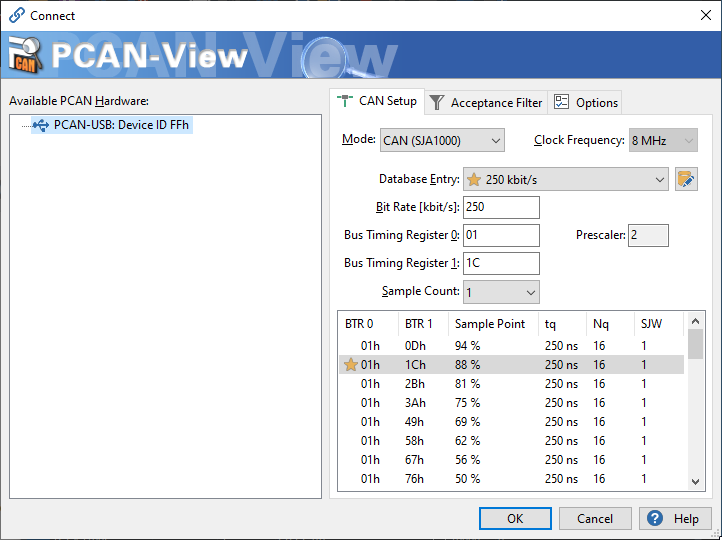
After you set up the CAN baud rate and timing parameters, you can set up an acceptance filter. This is convenient if you are only looking for a specific message and don't care about the rest of the network activity. Vehicle networks can have hundreds of messages that make it difficult to focus on the one or two messages you need to see.
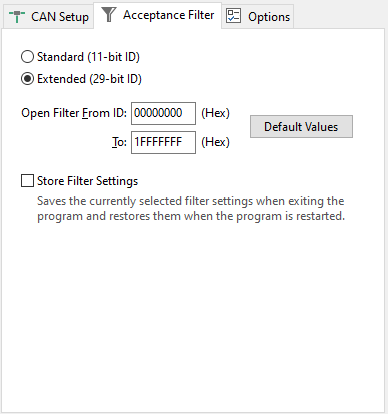
One big shortcoming of the Peak software is the way filtering is handled. The filter is set as a range of values instead of a mask/filter interface like most other software. Why is this bad? Lets say for example I want to see every message from source address 0x31. Well address 0x31 may send a message with ID 0x18EA0031 and also a message with ID 0x1CEC0031. With a mask/filter interface, I can enable just the last byte and set it to only accept messages ending in 0x31. With the Peak software's range filter, all messages between 0x18EA0031 and 0x1CEC0031 are also accepted. That's potentially 67,239,936 messages, although practically on a vehicle network it's probably more like 50 or so. Still annoying when you only want to see the 2 or 3 messages from address 0x31.
What I like about the Peak software is the ability to view the CAN data in a 'fixed' manner and a 'trace' at the same time. You can start recording a trace and save it to a .trc file, which opens with Peak software or any text editor. You can also view the trace right in the software, which is a little lighter than saving to a file and opening in another program.
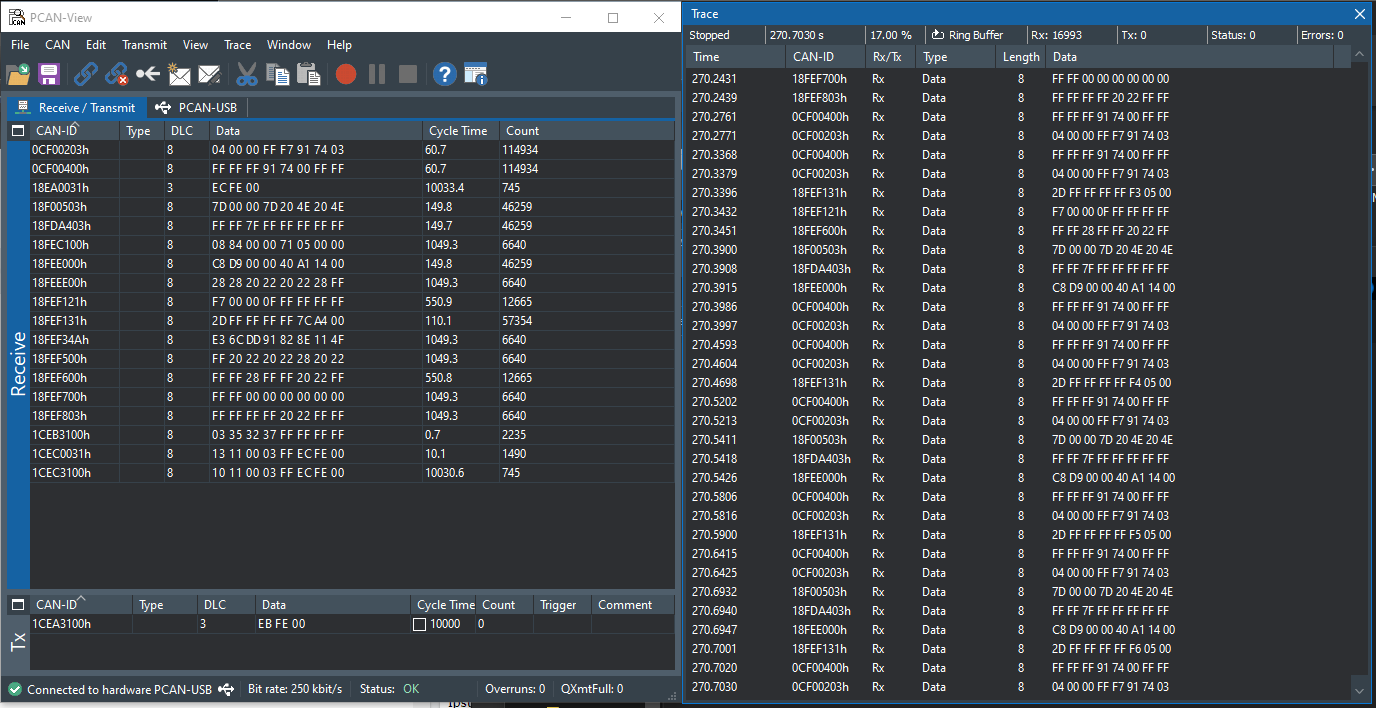
The PCAN-View software also operates with fewer bugs and glitches than CAN King. I find that CAN King often freezes or needs to be re-started, but PCAN-View just works all the time.
Kvaser U100
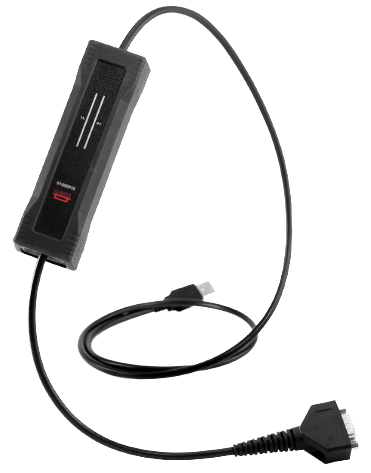
The Kvaser U100 CAN adapter is the more expensive of the two options presented here. Today, it is selling for $575 and like the Peak adapters, software and drivers are included free of charge. The Kvaser interface is physically larger and heavier than the Peak interface, but it includes some LED indicators that give you some indication of network traffic and direction. This isn't terribly useful and I wouldn't make it a deciding factor in which interface to get. The real deciding factor for me is the software, so let's talk about CAN King.
Kvaser CAN King
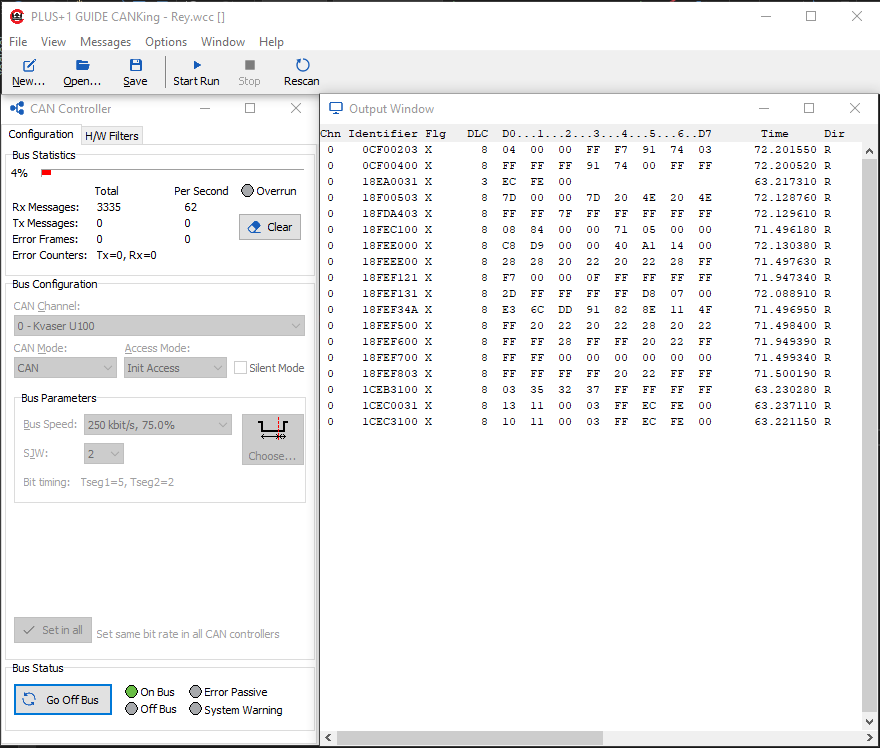
CAN King is free software from Kvaser that allows you to view and log CAN traffic. Like PCAN-View, the installation is pretty simple. Once the program launches, you can open an existing template or start with a blank one. This feature is nice if you work with different types of networks. For example, you can create a template for 11-bit ID decimal base machine networks and a totally separate template for 29-bit ID J1939 vehicle networks. CAN King even remembers which windows are open and their relative position.
The CAN King software is spread out into different windows. Unlike PCAN-View, which launches in a single window (or two windows if you have the trace viewer open), CAN King can have up to 8 windows open at once. This can be an advantage or disadvantage. You have the freedom to arrange the windows however you want and the program will remember the positions of the windows, but it can look a little more scattered than an interface that runs in a single window.
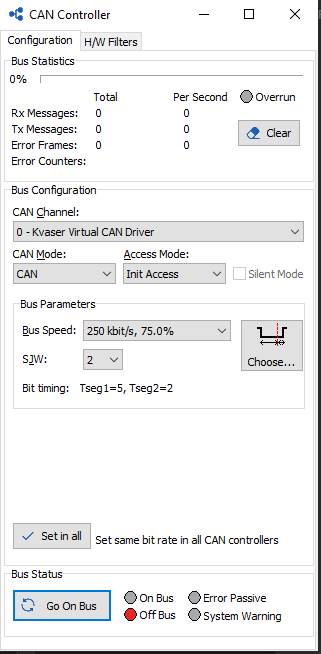
The controller window allows you to set the baud rate and timing parameters along with the mask/filter. Once everything is set, click "Go On Bus" and you'll see messages start streaming in the Output Window. The Formatter Window can be used to select different formatters, including a custom *.dbc file, which we'll talk about in a minute. For most CAN bus analysis, I just use the standard text formatter with everything set to hex. You can switch between logger view and fixed position view by right clicking in the Output Window and selecting or de-selecting "Fixed Positions".
CAN King does not allow you to view fixed and log data simultaneously like PCAN-View, but that isn't necessarily a problem since viewing the log data live isn't very useful. You can still record a log file while viewing the fixed position data. The log file format is *.txt and can be imported into other programs for later analysis. You can also record a log and view it in the CAN King software without saving to file, but I find that sometimes this causes the program to freeze and it needs to be re-started.
The biggest advantage to CAN King is the ability to apply a *.dbc file to live CAN traffic. A *.dbc file is a CAN Database file that allows you to customize the way signals are displayed. For example, you can build a DBC file that turns a raw CAN message for engine speed into something that actually says "Engine Speed: 837 rpm" instead of "0xCF00400 - FF FF FF 26 1A 00 FF FF" All of the scale factors and offsets can be stored in the DBC file so you don't need to do any math while viewing the data. Kvaser even offers a free DBC editor so you can create your own custom DBC files and apply them to live CAN data in CAN King. Depending on how much CAN troubleshooting you do, this feature alone may make the Kvaser hardware worth the extra $300.

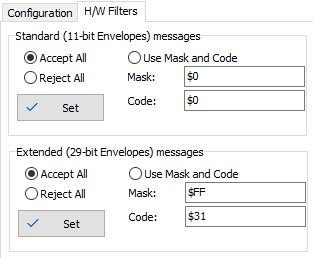
The mask/filter is also more practical in CAN King. Although it would be great to have both options, range and mask/filter, if I had to pick one, it would be mask/filter. Mask/filter allows you to mark certain bits for consideration, and then specify what those bits should be. Practically, I use this to filter messages from a specific source address or messages of a specific PGN. The mask/filter approach is way more practical than the range approach used by PCAN-View.
Conclusion
Both of these tools are more than enough to get you started with CAN bus analysis. If you think this is something you are not going to do often, or if you are cost-sensitive, the Peak System interface/software is the way to go. It's the best balance I could find between affordability, capability, and usability.
If you can spend the extra $300 on the Kvaser interface, the added software features could make that well worth the price. If you work with CAN often and the DBC file feature is a must have, then Kvaser is the way to go.
If you need more than PCAN-View or CAN King, there are paid versions of software with more features and capability that will work with your interface. You can also look into Vector for a more professional hardware/software package for your needs. Since this article is more focused on beginners, I recommend sticking with the lower cost interface/free software route to build your understanding and determine which features you really need in a CAN bus analysis software package.